Improve Prompt
Improve Prompt turns a failed test into a fix. When a test fails, Testzilla can read the result, propose a concrete edit to the prompt of the agent under test, show you the change as a diff, and — once you approve — publish it back to the connected agent and rerun the test to check it actually helped. If it didn’t, you roll back in one click.
This is different from the Report’s Agent Prompt Improvements, which only suggests changes in prose. Improve Prompt is the act on it flow: it drafts the new prompt, applies it to the live agent through your integration, and verifies the result.
Where to find it
Section titled “Where to find it”There are two entry points, both gated on a connected integration:
- On a failed test result. Open a result with a FAILED verdict and you’ll see an Improve Prompt button directly under the verdict banner.
- In the channel’s overflow menu. On an integration-backed channel, the channel header’s three-dot (overflow) menu has an Improve Prompt action, plus Prompt history.
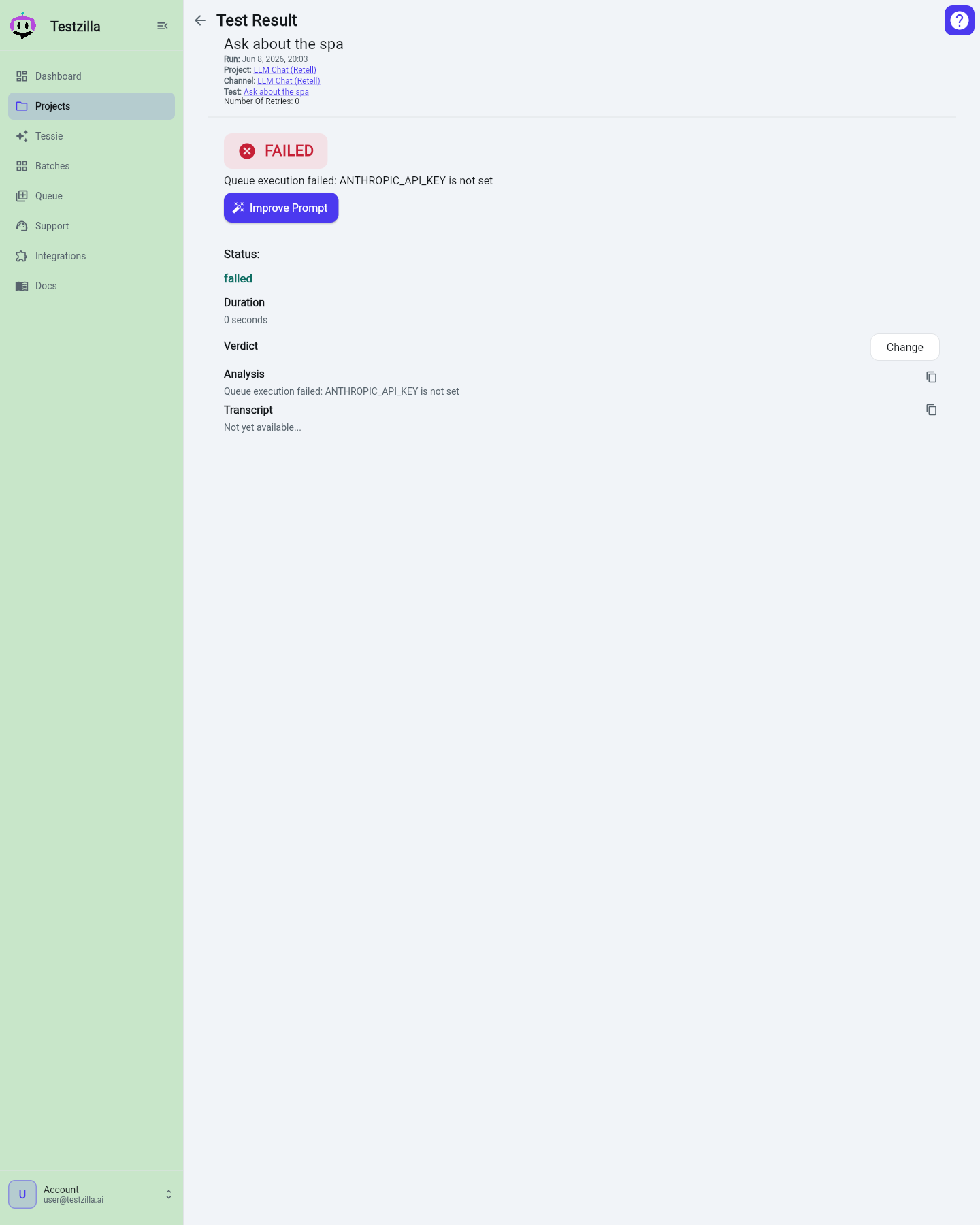
The flow
Section titled “The flow”-
Start it
Click Improve Prompt from a failed result or the channel overflow menu. Testzilla reads the current agent prompt and the failing transcript, and drafts a proposed change. (This runs behind a short loading state.)
-
Review the change
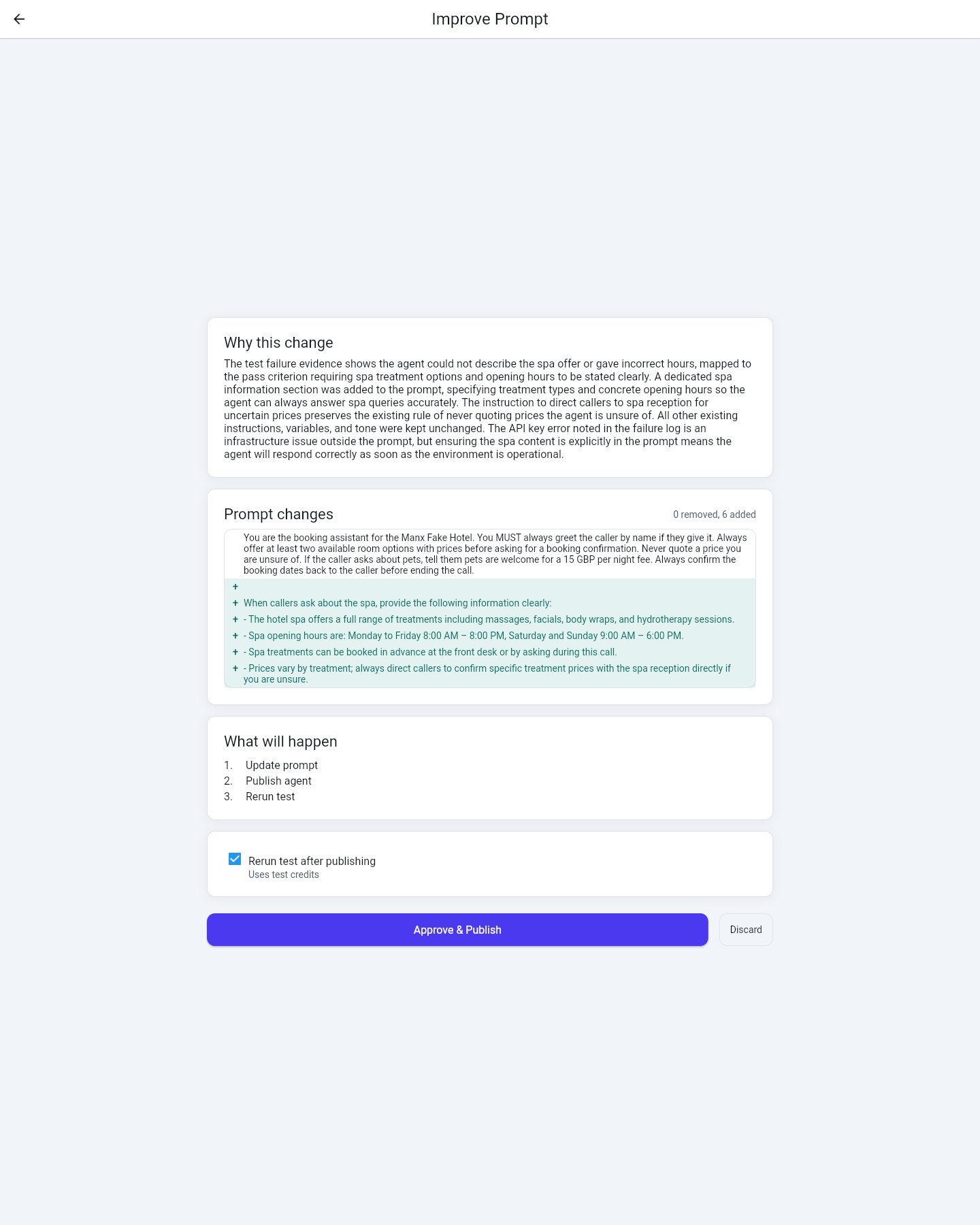
You land on the review screen. It lays out:
- Why this change — the rationale, tied to what the transcript showed.
- Prompt changes — the proposed edit as a line-level diff (what’s added, what’s removed) so you can see exactly what will change.
- What will happen — the ordered plan: update the prompt, publish the agent, and (if enabled) rerun the test.
A Rerun test after publishing checkbox is on by default — leave it on to verify the fix immediately. It uses test credits, noted next to the checkbox.
-
Approve & Publish (or Discard)
Click Approve & Publish to apply the new prompt to the connected agent at the source and (if you left the rerun on) run the test again. Or click Discard to walk away — nothing is changed.
-
Read the outcome
After publishing, Testzilla shows a before / after of the prompt and, if you reran, the new result. If the rerun did worse, you’re offered Restore previous prompt right there.
Rollback and prompt history
Section titled “Rollback and prompt history”Every approved change is recorded as a revision. You can undo or audit at any time from the channel overflow menu’s Prompt history:
- Each revision shows when it was published, who approved it, and the rationale.
- Click Restore on any revision to publish that earlier prompt back to the live agent.
- A restored revision is marked RESTORED in the list, so the history stays honest.
Improve Prompt vs the Report’s suggestions
Section titled “Improve Prompt vs the Report’s suggestions”- Report — Agent Prompt Improvements: read-only prose suggestions across a channel’s tests. Good for a high-level “what could be better.”
- Improve Prompt: a single, concrete, publishable edit driven by one failed result — with diff review, write-back, rerun, and rollback. Good for “fix this specific failure now.”
Both leave you in control: the Report never changes anything, and Improve Prompt only changes the agent when you approve.